
APT Portal Complete Guide 2026: Login, Features, Employee Work & Solutions
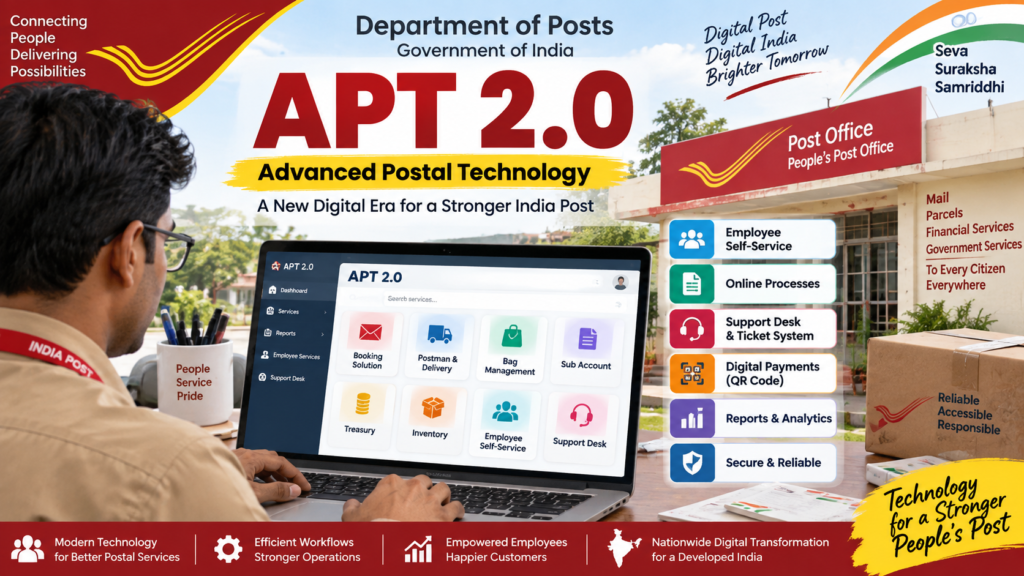
APT Portal यानी Advanced Postal Technology (APT) Department of Posts के IT Modernization Project 2.0 का महत्वपूर्ण हिस्सा है। APT के माध्यम से India Post के विभिन्न postal और operational processes को modern digital platform पर लाया गया है।
इस APT Portal Complete Guide 2026 में हम APT क्या है, APT Login कैसे करें, Employee ID का उपयोग कैसे होता है, TOTP और Mobile OTP क्या है, APT Dashboard में क्या मिलता है, Employee Self-Service में कौन-कौन से काम होते हैं, Support Desk क्या है, technical problem होने पर क्या करें और ticket कैसे raise करें—इन सभी महत्वपूर्ण बातों को आसान भाषा में समझेंगे।
APT Portal 2026 – Quick Information
| Information | Details |
|---|---|
| APT Full Form | Advanced Postal Technology |
| Project | Department of Posts – IT Modernization Project 2.0 |
| Developed By | Centre for Excellence in Postal Technology (CEPT) |
| APT Login | Official APT Employee Portal |
| User ID | Employee ID, as specified in the APT Operational Guide |
| Authentication | Portal login may use TOTP / Mobile OTP as applicable |
| Official Technology Organisation | CEPT |
APT क्या है?
APT का पूरा नाम Advanced Postal Technology है। यह Department of Posts के IT Modernization Project 2.0 के अंतर्गत विकसित किया गया नया digital postal technology platform है।
Department of Posts ने APT को postal और logistics operations को modernize करने के लिए nationwide rollout किया। Official Government information के अनुसार APT को Centre for Excellence in Postal Technology (CEPT) ने in-house develop किया है और यह Government of India’s MeghRaj 2.0 cloud platform पर hosted है।
APT का nationwide rollout अगस्त 2025 में पूरा किया गया और लगभग 1.70 लाख offices को 23 Postal Circles के अंतर्गत digital platform से जोड़ा गया।
APT के प्रमुख features में unified user interface, microservices-based architecture, cloud-ready deployment, end-to-end digital solution, QR-code payments और OTP-based delivery जैसी सुविधाएं शामिल हैं।
📄 Official Government Information on APT / IT 2.0
India Post में APT कब लागू हुआ?
APT का rollout phased manner में किया गया था। सबसे पहले Karnataka Circle में pilot implementation किया गया। इसके बाद अलग-अलग phases में nationwide implementation किया गया।
Government के अनुसार nationwide rollout 4 August 2025 तक पूरा हो गया और सभी 23 Postal Circles में offices को APT platform पर लाया गया।
- IT 2.0 के अंतर्गत APT विकसित किया गया।
- CEPT ने APT को in-house develop किया।
- APT को MeghRaj 2.0 cloud platform पर host किया गया।
- Nationwide rollout अगस्त 2025 में पूरा हुआ।
- 23 Postal Circles को APT ecosystem में शामिल किया गया।
APT Portal Login कैसे करें?
APT 2.0 का employee web portal Department of Posts के authorized users के लिए उपलब्ध है। APT Operational Guide में employee portal का login URL दिया गया है:
https://app.indiapost.gov.in/employeeportal/home
Important: केवल official India Post domain वाले portal का ही उपयोग करें। WhatsApp, Telegram या किसी unknown website से मिले login links पर अपना employee password, OTP या अन्य confidential details enter न करें।
Step 1 – Official APT Portal खोलें
सबसे पहले ऊपर दिए गए official APT Employee Portal को खोलें।
Step 2 – User ID दर्ज करें
APT Operational Guide के अनुसार employee का Employee ID login के लिए User ID के रूप में उपयोग किया जाता है।
Step 3 – Password दर्ज करें
Authorized employee को Department द्वारा निर्धारित password/credential का उपयोग करना चाहिए।
Step 4 – TOTP / Mobile OTP Authentication
Department के APT training material में web login के दौरान TOTP और Mobile OTP based authentication का उल्लेख किया गया है। आपके login environment में जो authentication method उपलब्ध हो, उसी prescribed process का पालन करें।
Step 5 – APT Dashboard खोलें
Successful authentication के बाद user को APT का dashboard दिखाई देता है। Dashboard पर उपलब्ध cards और modules user के role और authorization के अनुसार दिखाई देते हैं।
APT Login नहीं हो रहा है तो क्या करें?
APT login में problem आने पर तुरंत password या system settings में अनावश्यक बदलाव करने के बजाय नीचे दिए गए basic checks करें।
- Internet/network connection check करें।
- Official APT URL ही open किया है या नहीं देखें।
- Employee ID सही दर्ज करें।
- Password सही है या नहीं verify करें।
- OTP/TOTP authentication की स्थिति check करें।
- Browser को बंद करके दोबारा खोलें।
- जरूरत होने पर authorized system/device restart करें।
- Exact error message का screenshot लें।
- अगर problem लगातार बनी रहती है तो Support Desk में ticket raise करें।
APT की common problems के लिए हमारी detailed guide:
👉 APT में Common Problems और उनके Solutions – Complete Guide
APT Dashboard में क्या-क्या होता है?
APT dashboard को एक unified interface के रूप में design किया गया है। इसमें अलग-अलग modules/cards और उनके अंदर sub-cards उपलब्ध हो सकते हैं।
आपके user role के अनुसार आपको अलग-अलग options दिखाई दे सकते हैं। इसलिए किसी दूसरे employee के dashboard और आपके dashboard में options अलग होना संभव है।
APT Dashboard पर सामान्यतः क्या देखा जा सकता है?
- Assigned modules
- Available cards
- Sub-cards
- Employee Self-Service
- Operational modules
- Support Desk
- Reports और अन्य authorized functions
APT 2.0 के प्रमुख Modules
APT operational guides और training material में विभिन्न operational और employee-related modules का वर्णन किया गया है।
| Module | मुख्य उपयोग |
|---|---|
| Booking Solution | Postal booking और counter operations |
| Postman & Delivery | Delivery और postman-related operations |
| Bag Management | Bagging operations और related reports |
| Sub Account | Sub-account related operations |
| Treasury | Cash, cheque, stamps और अन्य treasury operations |
| Inventory | Indent, stock और inventory operations |
| Employee Self-Service | Employee-related services |
| Support Desk | Technical/functional issues और tickets |
APT में Employee Self-Service (ESS) क्या है?
APT में Employee Self-Service (ESS) employee-related digital services के लिए महत्वपूर्ण module है।
Official APT training material के अनुसार ESS के अंतर्गत Leave Management, Personnel Information, Employee Payments, Exit Management और Recruitment & Promotions जैसे employee-related functions उपलब्ध हो सकते हैं।
ESS में कौन-कौन से areas मिल सकते हैं?
- Leave Management System
- Personal Information System
- Employee Payments
- Exit Management
- Employee Transfers
- Recruitment & Promotions
उदाहरण के लिए, CEPT-hosted APT material में Employee Self-Service के अंतर्गत Recruitment & Promotions card और उसके अंदर Apply Online, My Applications, Support तथा Profile options दिखाए गए हैं।
Rule-38 Transfer से संबंधित latest information के लिए हमारा detailed article पढ़ें:
👉 India Post Rule-38 Transfer September 2026 – Final Schedule & Transfer OrderAPT Support Desk क्या है?
APT में Support Desk technical और functional problems को report करने तथा उनके resolution को track करने के लिए महत्वपूर्ण facility है।
उपलब्ध APT FAQ material के अनुसार departmental employee, जो office से mapped है, Support Desk के माध्यम से ticket raise कर सकता है।
Support Desk में issue को सही category, module और sub-module के साथ report करना महत्वपूर्ण है ताकि ticket संबंधित support level/team तक पहुंच सके।
APT में Ticket कब Raise करें?
हर छोटी problem के लिए तुरंत ticket raise करने के बजाय पहले basic troubleshooting करना उचित है। लेकिन यदि issue बार-बार हो रहा है या basic checks के बाद भी resolve नहीं हो रहा है तो Support Desk का उपयोग करें।
Ticket Raise करने की जरूरत कब पड़ सकती है?
- APT login लगातार fail हो रहा हो
- Application open नहीं हो रही हो
- Application submit नहीं हो रही हो
- Server/connectivity error बार-बार आ रहा हो
- Data गलत या missing दिखाई दे रहा हो
- Module/card उपलब्ध नहीं हो रहा हो जबकि user authorized हो
- Transaction/process technical कारण से अटक गया हो
- BPM/device से संबंधित persistent technical issue हो
APT में Support Ticket कैसे Raise करें?
APT में Support Desk उपलब्ध होने पर employee dashboard से Support Desk card/module को open किया जाता है।
Step 1 – APT में Login करें
Official APT Employee Portal खोलकर authorized credentials से login करें।
Step 2 – Support Desk खोजें
Dashboard पर Support Desk card देखें। यदि card सामने दिखाई नहीं दे रहा है तो उपलब्ध search option में Support या Desk search किया जा सकता है।
Step 3 – Raise Ticket चुनें
Support Desk के अंदर उपलब्ध Raise Ticket option को select करें।
Step 4 – Category चुनें
अपनी problem के अनुसार सही category चुनें। गलत category चुनने से ticket को सही support team तक पहुंचने में delay हो सकता है।
Step 5 – Module और Sub-Module चुनें
जिस application/module में समस्या आई है, उसके अनुसार module और sub-module select करें।
Step 6 – Problem Description लिखें
Problem description को छोटा लेकिन स्पष्ट रखें। केवल “APT नहीं चल रहा” लिखने के बजाय exact problem और error message लिखें।
Problem: APT application में transaction submit नहीं हो रही है।
Office: [Office Name]
User ID: [Employee ID – यदि prescribed field में आवश्यक हो]
Date/Time: [Date & Time]
Error: [Exact Error Message]
Action Taken: Network checked, application restarted and device restarted.
Attachment: Error screenshot attached.
Step 7 – Screenshot Attach करें
यदि error screen दिखाई दे रही है तो clear screenshot attach करें। Screenshot में password, OTP या अन्य confidential information दिखाई नहीं देनी चाहिए।
Step 8 – Ticket Submit करें
सभी details verify करने के बाद ticket submit करें और प्राप्त Ticket Number/Reference को सुरक्षित रखें।
APT Support Desk Ticket की Escalation कैसे होती है?
उपलब्ध APT Support Desk FAQ के अनुसार issue के प्रकार और configured workflow के आधार पर ticket अलग-अलग support levels से होकर आगे बढ़ सकता है।
FAQ material में Divisional Office, Regional Office, Circle Office और CEPT के L1, L2 तथा L3 support levels का उल्लेख किया गया है।
सभी tickets में सभी levels का उपयोग होना आवश्यक नहीं है; यह संबंधित module/sub-module के configured support workflow पर निर्भर कर सकता है।
Ticket Raise करने के बाद क्या करें?
- Ticket number/reference सुरक्षित रखें।
- Ticket status समय-समय पर check करें।
- Support team द्वारा additional information मांगी जाए तो समय पर दें।
- Additional screenshots/logs मांगे जाने पर उपलब्ध कराएं।
- Problem resolve होने के बाद ticket closure/confirmation की प्रक्रिया पूरी करें।
उपलब्ध Support Desk FAQ के अनुसार additional information मांगे जाने पर निर्धारित समय में information देना जरूरी है। FAQ में unresolved information requests और resolved tickets के auto-closure rules भी बताए गए हैं; इसलिए ticket में मांगी गई जानकारी को ignore न करें।
APT में आने वाली Common Problems
APT एक large integrated digital platform है, इसलिए problem केवल login तक सीमित नहीं होती। अलग-अलग modules में अलग-अलग technical और functional issues आ सकते हैं।
1. Login Problem
User ID, password, authentication, network या server-side issue के कारण login problem हो सकती है।
2. OTP/TOTP Problem
Authentication code प्राप्त न होने या invalid होने की स्थिति में prescribed authentication procedure follow करें।
3. Application Loading Problem
Network, browser/session या server-side issue के कारण module/card load नहीं हो सकता।
4. Application Submission Problem
Mandatory field, validation, network या backend issue के कारण submission fail हो सकती है।
5. Data Not Showing
गलत module, user mapping, data synchronization या backend issue के कारण expected data दिखाई नहीं दे सकता।
6. Device / Network Problem
खासकर field/BPM operations में network, device और application connectivity से संबंधित problems काम को प्रभावित कर सकती हैं।
BPM Device और APT का संबंध
IT 2.0 के अंतर्गत Branch Post Offices में digital devices और applications के उपयोग को मजबूत किया गया है। Government information के अनुसार Branch Post Offices को Android smartphones और in-house digital application ecosystem से support किया गया है।
इसलिए BPM के लिए केवल APT application को समझना ही पर्याप्त नहीं है; device, network, synchronization और application troubleshooting की basic जानकारी भी उपयोगी है।
👉 BPM Device में आने वाली Common Problems और Solutions
Employee को APT पर Daily Work करते समय किन बातों का ध्यान रखना चाहिए?
- काम शुरू करने से पहले network और device की स्थिति check करें।
- केवल authorized APT portal/application का उपयोग करें।
- अपने login credentials किसी दूसरे व्यक्ति को न दें।
- OTP/TOTP किसी के साथ share न करें।
- Transaction/application submit करने से पहले details verify करें।
- Failed transaction को तुरंत दोबारा submit करने से पहले status check करें।
- Technical error का screenshot रखें।
- Problem के कारण को स्पष्ट रूप से ticket में लिखें।
- Ticket number सुरक्षित रखें।
- Department द्वारा जारी latest SOP/instruction को प्राथमिकता दें।
APT के लिए Important Official Links
🔐 APT Employee Portal – Official Login
🌐 India Post – Official Website
Postal Knowledge पर APT और Employee से जुड़े Important Guides
APT की पूरी जानकारी को एक ही article में समाप्त करने के बजाय हमने अलग-अलग practical guides की series तैयार की है।
- APT में Employee Application कैसे करें – Step-by-Step Guide
- APT Common Problems और Solutions – Complete Troubleshooting Guide
- APT में Support Desk Ticket कैसे Raise करें?
- BPM Device Common Problems और Solutions
- BPM Device में APT काम नहीं कर रहा? Complete Troubleshooting Guide
Department of Posts से संबंधित latest employee updates, transfer, recruitment और अन्य important information के लिए Postal Knowledge का Employee section भी देखें।
APT Portal 2026 – Frequently Asked Questions
APT का Full Form क्या है?
APT का full form Advanced Postal Technology है।
APT Portal क्या है?
APT Department of Posts के IT Modernization Project 2.0 के अंतर्गत विकसित digital postal technology platform है।
APT Employee Login URL क्या है?
APT Operational Guide में employee portal के लिए यह URL दिया गया है:
https://app.indiapost.gov.in/employeeportal/home
APT में User ID क्या होती है?
APT Operational Guide के अनुसार employee का Employee ID login के लिए User ID के रूप में उपयोग किया जाता है।
APT Login में TOTP क्या है?
TOTP यानी Time-based One-Time Password authentication का एक तरीका है। APT training material में web login के लिए TOTP और Mobile OTP based authentication का उल्लेख किया गया है।
APT में Support Desk क्या है?
Support Desk APT में technical और functional problems को report करने, ticket raise करने और issue resolution को track करने के लिए उपयोग किया जाता है।
APT में Ticket कौन Raise कर सकता है?
उपलब्ध APT Support Desk FAQ के अनुसार office से mapped departmental employee Support Desk के माध्यम से ticket raise कर सकता है।
APT में Ticket Raise करते समय क्या लिखना चाहिए?
Problem का exact description, office details, applicable module, error message, date/time और relevant screenshot देना चाहिए। Password, OTP या अन्य confidential information ticket में share नहीं करनी चाहिए।
APT Login नहीं हो रहा है तो क्या करें?
Network, Employee ID, authentication और browser/application की basic स्थिति check करें। अगर problem बनी रहती है तो error screenshot के साथ Support Desk में ticket raise करें।
क्या सभी employees को APT में समान modules दिखाई देते हैं?
जरूरी नहीं। APT में उपलब्ध cards, modules और functions user role, office mapping और authorization के अनुसार अलग हो सकते हैं।
Conclusion – APT Portal को समझना क्यों जरूरी है?
Advanced Postal Technology (APT) Department of Posts के digital transformation का एक महत्वपूर्ण हिस्सा है। IT 2.0 के अंतर्गत APT को postal operations को modern, integrated और technology-driven बनाने के उद्देश्य से nationwide rollout किया गया।
Employee के लिए APT को समझने के साथ-साथ login process, dashboard, Employee Self-Service, operational modules और Support Desk का basic knowledge होना भी महत्वपूर्ण है।
खासकर जब किसी काम में technical problem आए, तो बिना अनुमान के system में बार-बार changes करने के बजाय problem को properly identify करके screenshot/details के साथ prescribed Support Desk process follow करना बेहतर है।
APT से संबंधित किसी भी महत्वपूर्ण departmental work के लिए latest official SOP, circular, order और instructions को final reference मानें। Postal Knowledge का उद्देश्य employees को information आसान भाषा में समझाने में मदद करना है।
Disclaimer
यह article employees और postal users की सुविधा के लिए तैयार किया गया informational guide है। Postal Knowledge Department of Posts / India Post की official website नहीं है।
APT के modules, workflows, login process, support mechanism और अन्य features Department द्वारा समय-समय पर update किए जा सकते हैं। इसलिए किसी भी official/departmental decision के लिए Department of Posts, India Post और CEPT द्वारा जारी latest official instructions को ही प्राथमिकता दें।