
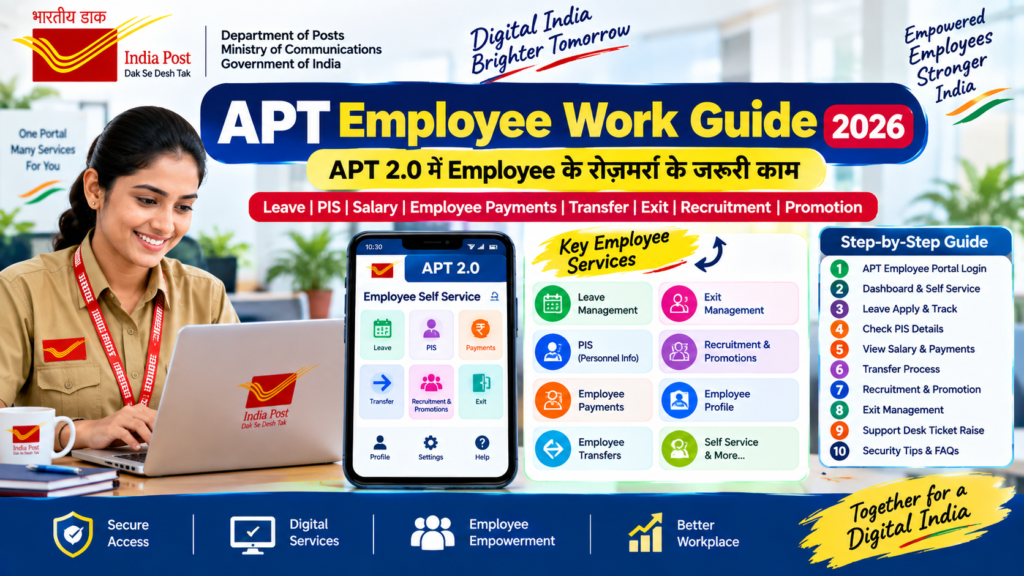
APT Employee Work Guide 2026
APT 2.0 में Employee के रोज़मर्रा के जरूरी काम कैसे करें?
Leave • PIS • Salary • Employee Payments • Transfer • Exit • Recruitment • Promotion
📌 APT Employee Work Guide – Quick Answer
India Post के APT 2.0 Employee Self Service (ESS) के माध्यम से कर्मचारियों को कई महत्वपूर्ण employee-related services एक ही platform से access करने की सुविधा मिलती है।
इसमें मुख्य रूप से Leave Management System, Personnel Information System (PIS), Employee Payments System, Exit Management, Employee Transfers तथा Recruitment & Promotions जैसे modules शामिल हैं।
इस article में हम इन सभी कामों को आसान भाषा में समझेंगे और साथ ही common problems, Support Desk और जरूरी precautions भी जानेंगे।
अगर आप APT 2.0 के बारे में शुरुआत से पूरी जानकारी चाहते हैं तो पहले हमारा APT Portal Complete Guide 2026 पढ़ सकते हैं।
📚 इस Article में क्या मिलेगा?
- APT Employee Login
- APT Dashboard और Employee Self Service
- Leave Management System
- Personnel Information System (PIS)
- Employee Payments System
- Exit Management
- Employee Transfers
- Recruitment & Promotions
- Employee Profile और Personal Details
- Common APT Employee Problems
- Support Desk से Ticket कैसे Raise करें?
- Security और Privacy Tips
- Frequently Asked Questions
🔐 1. APT Employee Portal में Login कैसे करें?
APT Employee Portal में login करने के लिए Department of Posts का designated APT portal इस्तेमाल किया जाता है।
Login के लिए सामान्य प्रक्रिया
- APT Employee Portal खोलें।
- अपना authorized Employee ID/User ID दर्ज करें।
- Portal द्वारा मांगा गया authentication पूरा करें।
- यदि TOTP या Mobile OTP का option उपलब्ध हो तो उसे पूरा करें।
- Login के बाद APT Dashboard दिखाई देगा।
APT login और dashboard की detailed जानकारी के लिए हमारा dedicated article पढ़ें:
👉 APT Login 2026 – Employee Portal Login & Dashboard Complete Guide
Official APT Portal: India Post APT Employee Portal
🖥️ 2. APT Dashboard और Employee Self Service
Login करने के बाद employee को role और mapping के अनुसार अलग-अलग cards/subcards दिखाई दे सकते हैं।
Employee-related कामों के लिए सामान्यतः Self Service / Employee Self Service section महत्वपूर्ण होता है।
Leave Management
Personnel Information
Employee Payments
Employee Transfers
Recruitment & Promotions
Exit Management
🗓️ 3. APT में Leave कैसे Apply करें?
APT Employee Self Service में Leave Management System कर्मचारियों के लिए सबसे महत्वपूर्ण modules में से एक है।
Leave Management में क्या-क्या options मिल सकते हैं?
- Apply Leave
- Withdraw Leave Request
- View Leave Balance
- Leave Report
- Initiate Charge Report
- Holiday Calendar
- Fitness Certificate Upload
- Report Unavailed Joining Time
- Staff on Leave information
- APT में Login करें।
- Self Service section खोलें।
- Leave Management System select करें।
- Apply Leave option चुनें।
- Leave type और required dates/details भरें।
- जरूरी supporting document हो तो upload करें।
- Submit करने से पहले सभी details check करें।
- Application submit करें और status track करें।
Leave के प्रकार, approval authority और उपलब्ध options आपके applicable rules और system configuration के अनुसार हो सकते हैं।
👤 4. PIS – Personnel Information System
PIS (Personnel Information System) employee की personnel information से संबंधित services के लिए उपयोग किया जाता है।
PIS में किस प्रकार का काम हो सकता है?
- Employee personal information देखना
- Available profile details check करना
- कुछ mapped personal/contact information update करना
- Employee information की verification करना
- System में उपलब्ध personnel details को review करना
💰 5. Employee Payments System – Salary और Payment Details
APT Employee Self Service में Employee Payments System (EPS) employee payments से संबंधित information access करने के लिए उपलब्ध है।
Employee Payments में क्या check कर सकते हैं?
- Available salary/payment details
- Payment related information
- System में उपलब्ध employee payment records
- Applicable payment information/reports
🚪 6. Exit Management क्या है?
APT Employee Self Service में Exit Management employee की exit-related formalities/processes के लिए उपलब्ध module है।
किसी employee की retirement, resignation या अन्य exit-related situation में system में उपलब्ध relevant workflow authority और applicable rules के अनुसार follow किया जाता है।
🔄 7. APT में Employee Transfer से संबंधित काम
APT Employee Self Service में Employee Transfers module उपलब्ध है। उपलब्ध workflow के अनुसार employees transfer-related applications/processes access कर सकते हैं।
Employee Self Service FAQ के अनुसार Transfers section में applicable transfer processes के लिए options उपलब्ध हो सकते हैं, जिनमें Rule 3 और Rule 38 transfer भी शामिल हैं।
Transfer के लिए सामान्य checklist
- Employee profile/details सही हैं या नहीं check करें।
- Applicable transfer category/rule verify करें।
- Required documents/information पहले तैयार रखें।
- Application submit करने से पहले सभी entries verify करें।
- Application/reference number सुरक्षित रखें।
- Status को समय-समय पर prescribed portal में check करें।
Rule 38 की latest information के लिए हमारा dedicated article भी देखें:
👉 India Post Rule 38 Transfer – Latest Update 2026
और transfer schedule के लिए:
📋 8. Recruitment & Promotions Module
APT Employee Self Service में Recruitment and Promotions section भी उपलब्ध है।
इस section के माध्यम से eligible employees को applicable recruitment, examination, promotion अथवा departmental selection related applications के लिए system-based options मिल सकते हैं।
Application submit करने से पहले
- Notification/eligibility conditions carefully पढ़ें।
- Employee profile details verify करें।
- Required documents तैयार रखें।
- Application में सही information भरें।
- Final submission से पहले preview/check करें।
- Application/reference number save करें।
APT operational guide में Recruitment & Promotions portal के अंदर dashboard, online applications, my applications, support और profile जैसे sections भी दिखाए गए हैं।
🪪 9. Employee Profile और Details कैसे Check करें?
APT में employee profile section के माध्यम से system में mapped employee information देखी जा सकती है।
- User/Employee ID
- Post ID
- Office ID
- Designation
- Cadre information
- Office information
- अन्य mapped employee details
यदि profile में कोई गलत या पुरानी information दिखाई देती है तो उसे बिना authority/process verify किए manually बदलने की कोशिश न करें।
🛠️ 10. APT Employee Work में Common Problems
| Problem | Possible Action |
|---|---|
| Login नहीं हो रहा | Credentials/authentication check करें और portal को दोबारा खोलकर try करें। |
| OTP/TOTP problem | Authentication method और current registered details check करें। |
| Card दिखाई नहीं दे रहा | Dashboard के दूसरे pages/cards और search option check करें। |
| Leave option नहीं दिख रहा | Employee role/mapping और Self Service section check करें। |
| Transfer option नहीं दिख रहा | Eligibility, mapping और current application cycle/portal configuration verify करें। |
| Portal slow है | Network check करें, कुछ समय बाद retry करें और persistent issue होने पर Support Desk का उपयोग करें। |
APT की common problems के detailed solutions के लिए:
🎫 11. APT Support Desk से Ticket कैसे Raise करें?
अगर APT में कोई functional या technical problem लगातार बनी रहती है और normal troubleshooting से solve नहीं होती, तो applicable Support Desk process का उपयोग किया जा सकता है।
Ticket में क्या information दें?
- सही office/post office details
- Problem की clear description
- Correct Category
- Correct Module
- Correct Sub Module
- Problem का clear Subject
- जरूरी screenshot/document
- यदि मांगा जाए तो additional information
Support Desk में ticket raise करने की complete step-by-step प्रक्रिया के लिए:
🔗 BPM Device और APT Troubleshooting
अगर आप BPM/BO device से काम कर रहे हैं और APT/DREAM app में problem आ रही है, तो ये दोनों guides भी जरूर पढ़ें:
🔒 12. APT Employee Portal इस्तेमाल करते समय Security Tips
- Password किसी के साथ share न करें।
- OTP/TOTP किसी व्यक्ति को न बताएं।
- Public computer पर credentials save न करें।
- Screenshot share करते समय Employee ID, mobile number और sensitive information hide करें।
- Customer information वाला screenshot public WhatsApp/Telegram groups में share न करें।
- Unknown links से APT login न करें।
- केवल official/authorized portal का उपयोग करें।
- Problem report करते समय आवश्यक technical information ही दें।
🌐 Important Official Links
🎥 APT Employee Self Service Video
Employee Self Service के login, profile, leave, payment और अन्य features को समझने के लिए नीचे दिया गया reference video उपयोगी हो सकता है।
▶ Employee Self Service App | India Post IT 2.0 ESS | Complete Overview
नोट: Video में दिखाई देने वाला interface या process current portal version के अनुसार बदल सकता है। किसी भी महत्वपूर्ण departmental action के लिए latest official instructions को प्राथमिकता दें।
📄 APT Employee Self Service – Reference Documents
Employee Self Service की detailed functionality और operational process को समझने के लिए departmental reference documents भी उपयोगी हैं।
✅ APT Employee Work – Quick Checklist
❓ APT Employee Work Guide – FAQs
APT Employee Self Service में कौन-कौन से modules हैं?
मुख्य modules में Leave Management System, Personnel Information System, Employee Payments System, Exit Management, Employee Transfers तथा Recruitment & Promotions शामिल हैं।
APT में Leave कैसे apply करें?
APT में Login करके Self Service section में जाएं और Leave Management System के अंदर Apply Leave option का उपयोग करें। Final submission से पहले सभी details verify करें।
APT में Rule 38 transfer का option कहां मिलेगा?
Applicable employees के लिए Employee Self Service के Employee Transfers section में transfer-related options उपलब्ध हो सकते हैं। Current cycle और eligibility conditions को जरूर verify करें।
APT में कोई card दिखाई नहीं दे रहा तो क्या करें?
Dashboard के दूसरे pages और available search option check करें। यदि card फिर भी उपलब्ध नहीं है तो role/mapping या technical issue हो सकता है। Persistent issue होने पर Support Desk का उपयोग करें।
APT में employee problem के लिए ticket कहां raise करें?
APT के Support Desk section का उपयोग किया जा सकता है। Ticket में सही Category, Module, Sub Module और problem description देना जरूरी है।
क्या APT Employee Portal का interface बदल सकता है?
हाँ। APT 2.0 लगातार विकसित होने वाला platform है और cards, menu, workflows तथा interface में changes हो सकते हैं। इसलिए latest official instructions को प्राथमिकता दें।
📚 Related APT Articles
1. APT Portal Complete Guide 2026
2. APT Login 2026 – Employee Portal & Dashboard
3. APT Common Problems & Solutions 2026
4. APT Support Desk – Ticket Raising Guide
🎯 Conclusion
APT 2.0 ने Department of Posts में employee-related digital services को एक unified platform के माध्यम से access करने का रास्ता आसान बनाया है। Employee Self Service के जरिए leave, personnel information, payments, transfer, exit तथा recruitment/promotion जैसे कई काम digital workflow में किए जा सकते हैं।
लेकिन किसी भी important departmental application को submit करने से पहले eligibility, applicable rules, documents और latest departmental instructions जरूर verify करें।
अगर APT में technical या functional problem आती है और basic troubleshooting से समाधान नहीं होता, तो proper details के साथ Support Desk का उपयोग करना बेहतर है।